
Let me paint you a familiar picture. It’s 7:03 AM. You’re rushing to get ready for work, you glance at your kitchen counter, and your microwave is still flashing 12:00 from last night’s power blip. Or maybe it’s daylight saving time again, and that stubborn clock is still off by an hour. Frustrating, right?
You’re not alone. Knowing how to change time on microwave is one of the most commonly searched kitchen appliance questions online and yet most people either skip it entirely or spend ten minutes pressing random buttons hoping something sticks. This guide is here to fix that.
Whether you own a Samsung, GE, LG, Whirlpool, or a no-name countertop unit, I’m going to walk you through exactly how to change time on microwave models across every major brand clearly, quickly, and without needing to dig through a dusty manual.
Why Your Microwave Clock Keeps Resetting
Before diving into the steps for how to change time on microwave displays, it helps to understand why the clock resets in the first place. The most common culprits are:
- Power outages or surges — Even a brief flicker resets the internal clock
- Daylight saving time — Twice a year, millions of people need to adjust clocks
- New installation — Fresh out of the box, your microwave has no idea what time it is
- Accidental button presses — Kids (or adults) lean on the control panel
According to the U.S. Bureau of Labor Statistics, more than 90% of American households own a microwave. That’s tens of millions of kitchens where someone, at some point, needs to figure out how to change time on microwave settings. And according to Statista, the U.S. microwave oven market was valued at approximately $2 billion in 2024, growing at a CAGR of 5.31% through 2029 meaning millions of new units are being set up every single year.
So yes this is a real, universal need. Let’s solve it.
How to Change Time on Microwave: The Universal Method
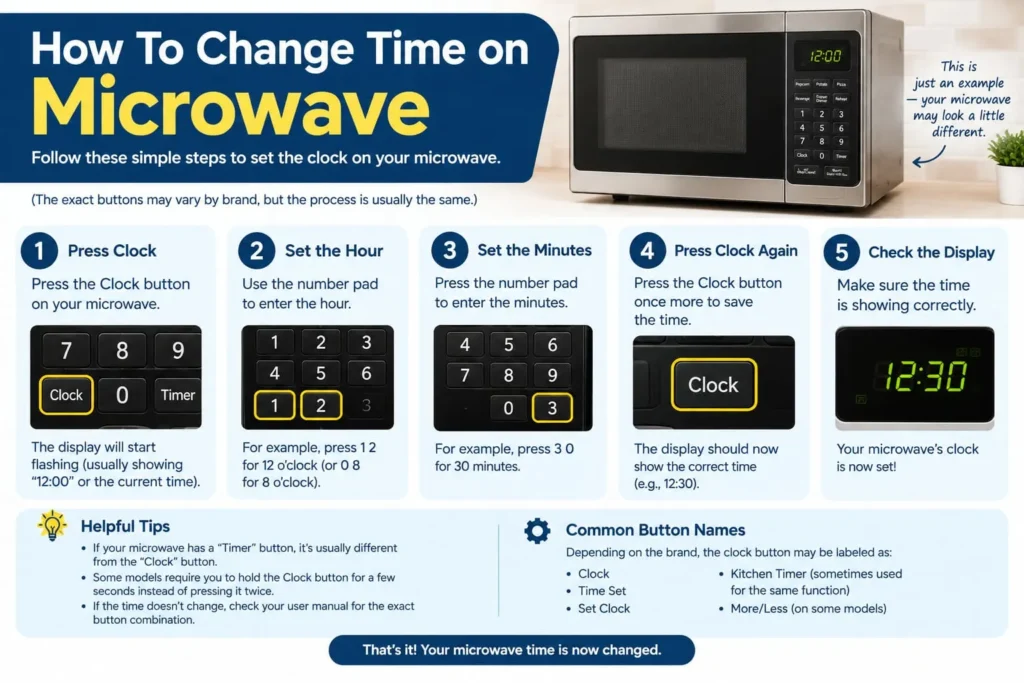
Most microwaves regardless of brand follow a similar logic. Here is the general approach that works for a majority of models when you need to know how to change time on microwave controls:
- Locate the “Clock” button on your control panel (sometimes labeled “Clock Set” or “Time”)
- Press the Clock button once to enter clock-setting mode
- Enter the current time using the number pad (e.g., press 1, 0, 3, 0 for 10:30)
- Select AM or PM if your microwave uses a 12-hour format
- Press Clock again (or “Start” on some models) to confirm and save
That’s the core process. Simple enough but the exact button names and sequences vary brand to brand. That’s where the details matter.
How to Change Time on Microwave by Brand
GE Microwaves: Step-by-Step Clock Reset
GE is one of the most popular microwave brands in American kitchens. Here is how to change time on microwave units made by GE:
- Press the “Clock” button
- Enter the time using the number pad
- Press “Clock” again to confirm
On newer GE models with a touchscreen interface, you may need to go to Settings > Clock before entering the time. Some GE models use a “Set Clock” button instead of a standalone “Clock” key look for it near the top or bottom of the control panel.
Samsung Microwaves: Quick Clock Adjustment
Samsung microwaves come in two control styles: dial-based and touch panel. Knowing how to change time on microwave for Samsung depends on which type you have.
Dial-Based Models:
- Press the “Clock Select” button (next to the dial, marked with a clock icon)
- Use the dial to select 12-hour or 24-hour format
- Turn the dial to set the hour, press OK
- Turn the dial again to set the minutes, press OK
Touch Panel Models:
- Tap “Settings” or the clock icon on screen
- Select “Date/Time” from the menu
- Enter the correct hour and minutes
- Confirm with “OK” or “Start”
According to Samsung’s official support page, the clock display activates automatically when power is supplied, showing “88:88” briefly before defaulting to “12:00.” This is your cue to set the correct time.
LG Microwaves: Setting the Clock Fast
For LG owners wondering how to change time on microwave models, the process is refreshingly consistent across most LG lines:
- Press and hold the “Clock” button for 3 seconds
- Use the number pad to enter the time (in HHMM format)
- Press “Clock” once more to save
Some LG models use a “Kitchen Timer/Clock” combo button press it once for the timer, twice for the clock.
Whirlpool Microwaves: Simple Two-Step Clock Set
Whirlpool microwaves are designed for ease of use. Here is how to change time on microwave Whirlpool appliances:
- Press “Clock” (or “Options” on some models, then scroll to Clock)
- Enter the time using the number pad
- Press “Start” to save
If your Whirlpool uses the “Options” menu, you may need to scroll through settings using arrow buttons before finding the clock option.
Panasonic Microwaves: The Unique Pad System
Panasonic uses a slightly unconventional button layout that trips a lot of people up when they try to figure out how to change time on microwave Panasonic models. Here’s the trick:
- The 10-minute pad advances the hours
- The 1-minute pad advances time in 5-minute increments
- The 10-second pad advances the minutes
Once you have the correct time set, press the “Timer/Clock” pad once to confirm. Note: Panasonic uses a 12-hour clock format, so do not attempt to enter 18:00 for 6:00 PM.
Brand-by-Brand Quick Reference Table
| Brand | Clock Button | Confirm With | Format Options |
|---|---|---|---|
| GE | “Clock” | “Clock” again | 12-hour |
| Samsung | “Clock Select” or Settings | “OK” | 12 or 24-hour |
| LG | Hold “Clock” 3 sec | “Clock” again | 12-hour |
| Whirlpool | “Clock” or “Options” | “Start” | 12-hour |
| Panasonic | “Timer/Clock” | “Timer/Clock” | 12-hour only |
| Sharp | “Clock” | “Enter” | 12-hour |
| Toshiba | “Settings” > Clock | “OK” | 12 or 24-hour |
This table should make it easy to identify how to change time on microwave settings regardless of the brand sitting on your counter.
How to Change Time on Microwave Without a Clock Button
Here’s a scenario I’ve personally run into: you’re staring at a microwave with no obvious “Clock” label anywhere. Maybe the button has worn off, or it’s a budget model that labels things differently. In that case, try these alternatives for how to change time on microwave panels with no explicit clock key:
- Look for a “Settings” or “Options” button most modern microwaves bury the clock inside a settings menu
- Try pressing “Time Cook” followed by entering the time some older models use this sequence
- Check if there is a “Power Level / Clock” combo button (press and hold for 3 seconds)
- On touch-screen models, swipe left or access a gear icon to find the clock setting
If none of those work, a quick search with your model number printed inside the door frame will pull up the exact manual for how to change time on microwave units from that specific model line.
How to Change Microwave Clock After Daylight Saving Time
Twice a year, daylight saving time shifts the clock by an hour and your microwave does not update itself. Unlike your smartphone, it has no idea what time zone you’re in. Knowing how to change time on microwave displays after DST is the same process as a regular clock reset, just with one key difference:
Spring Forward: Add 1 hour to the displayed time Fall Back: Subtract 1 hour from the displayed time
The steps remain identical to your brand-specific process above. The important habit is simply remembering to do it alongside your other clock adjustments. I have a personal reminder set every March and November it takes less than 30 seconds once you’ve done it a couple of times.
For more home appliance tips and kitchen upgrade ideas, Homes Remodeler offers a comprehensive resource for everything from small appliance setups to full kitchen remodels.
Troubleshooting: When the Clock Won’t Save
Sometimes you’ll follow every step perfectly and still struggle with how to change time on microwave clocks that simply won’t stick. Here are the most common issues and fixes:
Problem: Clock resets every time the microwave is used Fix: This usually means a software glitch. Unplug the microwave for 60 seconds, plug it back in, and reset the clock immediately before using it.
Problem: No response when pressing the Clock button Fix: The control lock feature may be activated. Look for a “Control Lock” or “Child Lock” button hold it for 3 seconds to deactivate, then retry how to change time on microwave steps.
Problem: Numbers won’t enter correctly Fix: Ensure you’re pressing keys firmly and not holding them too long (holding triggers timers, not clocks on some models).
Problem: Clock shows correct time but reverts after an hour Fix: A failing capacitor inside the microwave may be unable to hold memory. This is a hardware issue contact the manufacturer or a certified appliance technician.
Smart Microwaves: Does Auto-Sync Fix the Clock Problem?
The latest generation of connected smart microwaves is beginning to address the age-old question of how to change time on microwave displays by eliminating the need to do it manually. Smart microwaves from Samsung, Toshiba, and GE that connect to your home Wi-Fi can sync the clock automatically via the internet, just like your phone does.
According to the Knowledge Sourcing Intelligence report, the global microwave oven market is projected to grow from $14.43 billion in 2025 to $19.43 billion by 2030 at a CAGR of 6.10%, with smart connectivity listed as one of the key drivers. Statista also notes that the United States is experiencing a surge in demand for high-tech, smart microwave ovens offering advanced features and connectivity options.
So while today you still need to know how to change time on microwave clocks manually, the next generation of kitchen appliances may take that chore off your hands entirely.
Pro Tips to Make Clock Resetting Easier
A few things I’ve picked up from personal experience that make how to change time on microwave processes faster and less frustrating:
- Write your model number inside a cabinet door — this makes finding the manual instant
- Screenshot your microwave manual’s clock page — save it to a folder on your phone labeled “Home Appliances”
- Set a reminder each DST weekend — it only takes 30 seconds but people forget every time
- Use the 24-hour format if your model supports it — it removes AM/PM confusion entirely
- Reset the clock immediately after a power outage — waiting makes it easy to forget
These small habits turn how to change time on microwave from an occasional annoyance into a two-second task.
Frequently Asked Questions (FAQs)
How Do I Change the Time on My Microwave Without a Clock Button?
If your microwave has no visible “Clock” button, look for a “Settings,” “Options,” or gear icon on the control panel. Many modern microwaves include the clock function within a settings menu. On some older models, pressing and holding “Time Cook” for about three seconds may open the clock-setting mode.
Why Does My Microwave Clock Keep Resetting to 12:00?
A microwave clock can reset to 12:00 after a power interruption, even if the interruption is very brief. If it keeps resetting without noticeable power outages, there may be an issue with the power connection or an internal component. Try plugging the microwave into a different outlet to help rule out an outlet or wiring problem.
How Do I Change the Time on a Samsung Microwave Specifically?
The steps vary by Samsung microwave model. On some models with a dial, you can press the “Clock Select” button, choose a 12- or 24-hour format, set the hours and minutes, and confirm each selection with “OK.” Touch-panel models may place the clock controls under Settings. Check your specific model’s manual or Samsung’s support documentation for the exact button sequence.
Is There a Universal Way to Change the Time on Any Microwave?
There is no single method that works on every microwave, but a common sequence is to press “Clock,” enter the time using the number keypad, and then press “Clock” or “Start” to confirm. Controls can vary between brands and models, so the owner’s manual is the most reliable source for model-specific instructions.
How Long Does It Take to Change the Time on a Microwave?
Once you know the correct button sequence for your microwave, changing the time usually takes less than 30 seconds. The first attempt may take longer while you locate the clock function and determine which controls your model uses.

